
Where Innovations meet Certification

Become RedHat Certified Architect

Why Wait? Skip the MCA and Mtech Routes and Dive Straight Into Practical Learning

RHCA Program offers Direct access to
industry relevant skills !

  • Your RedHat Certification Would be Globally Recognized More than Your Master Degree
  • It it the Highest Level Certificate of RedHat
  • It gives Sure Shot Placement & Best Job in the Market
  • Do You Know? Only Few Hundreds People Became RHCA till Now, So Be One Of Them
  • The Average Salary Package That RHCA Earns Goes 10-30LPA

Are you the right candidate for RHCA?

One of the first things that comes to any aspiring individual mind is whether the intended course is one for them or not. The same question must be twirling inside of your mind too, especially after having already invested so much of your energy, time and money into different courses.

If you wish to check whether you are making it on to the list of the most suitable RHCA candidate or not, here is a check list you can look for –
  • If you are a Btech/BCA/MCA graduate or an undergraduate who is aspiring to be an RHCA
  • If you are in search of a JOB guarantee program, with 100% JOB ASSURITY in your hand
  • If you are BCA /Btech and want to pursue post graduation degree but in spite of that can go for RHCA
  • If you are a Linux System administrator currently possessing the RHCSA/RHCE certification, then you are eligible to take you career to heights by doing RHCA
  • If you are an IT geek/person and want to make career in the field of Red Hat or switch their domain

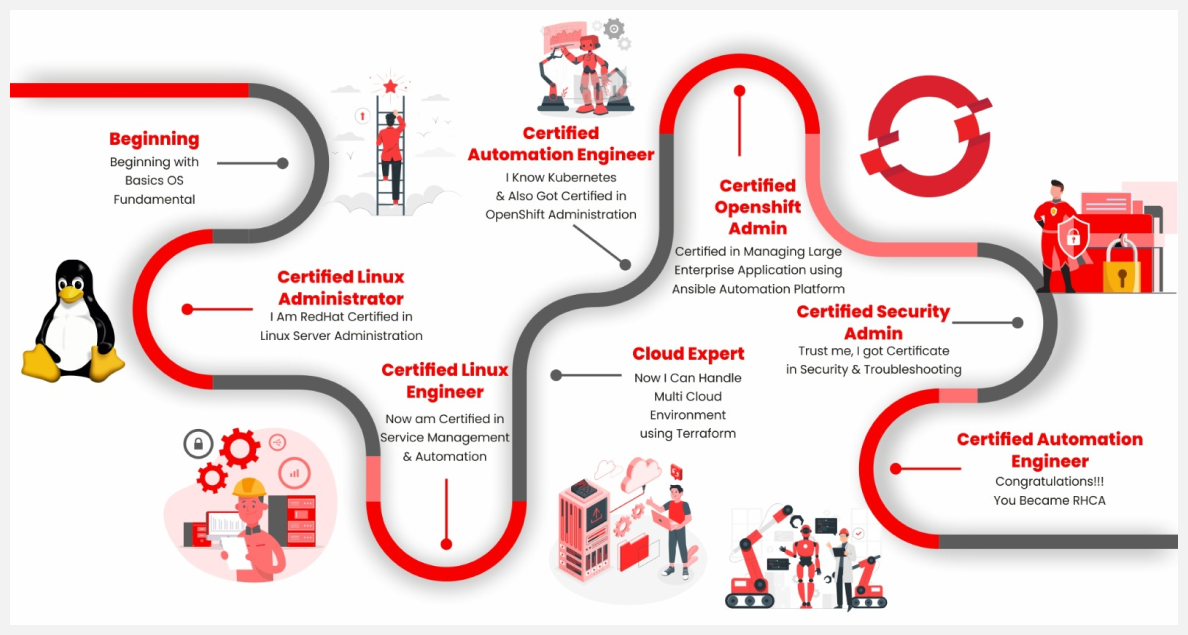
Journey of RHCA Program

How We Will Make You Expert

  • One On One Mentor For Your Any Tech Query
  • You Will Get Cloud Based LAB
  • Industry Relevent Project
  • Performance Tracking Weekly

Detailed Course Content

    • Introduction about IT and Demanding Technologies
    • Intro about DevOps & Cloud Computing
    • Intro about tools and technology for DevOps & Cloud Computing
    • Intro about Open Source Technology & Tools
    • Hardware vs Software and How they work together
    • Operating System Intro and Types of OS
    • Installing OS (Linux) on Bare Metal, Virtual Machine, & Cloud
    • Accessing Linux Machine Remotely & Physically
    • Understanding CLI & GUI & Managing Linux via CLI
    • Shell Basics
    • Operating System Intro and Types of OS
    • Installing OS (Linux) on Bare Metal, Virtual Machine, & Cloud
    • Basics of Operating System and Performing Basic Tasks
    • Understanding of Filesystem and Its architecture
    • Accessing Linux Machine Remotely & Physically
    • Understanding CLI & GUI & Managing Linux via CLI
    • Shell Basics (Basic Commands, Variables, I/O Redirection)
    • Getting Help in Shell
    • Understanding Authentication, Authorization & Auditing
    • User creation and Management
    • Configuring Permission to restrict access (Basic Permission, Special Permission, ACL, Attributes)
    • Understanding Process Management & Monitoring System activity via GUI and CLI with different-2 tools (ps, top, htop, vmstat, iostat)
    • Understanding rpm packages and Repository concepts in Linux
    • Installing software and patching updates
    • Service Management & Configuration using systemctl
    • Understanding Networking like how computer communicates with each other
    • Understanding IP addresses, Protocols, Server-Client Model, TCP/IP Model
    • Configuring IP address via GUI & CLI and Troubleshooting Network Issues
    • Understanding Storage Management & Configuring Partitions using fdisk and Parted command
    • Configuring swap partition, LVM Partition, Thin Provisioning, VDO and Stratis along with understanding fstab file
    • Creating shell script to automation system administration tasks
    • Scheduling tasks using cronjob & anacron
    • Understanding Log Management & Audit system using different-2 tools like auditctl and journalctl command
    • Taking Backup using backup tools and remote data transfer
    • Understanding Encryption & SSH and how ssh uses encryption to secure shell access
    • Configuring secure login using passwordless authentication and SSH Hardening
    • Understanding Boot Process and Troubleshooting boot issues, reset root password
    • NFS Concept & Practical
    • Automounting using NFS
    • Podman Overview
    • Container Operation using Podman
    • Setup Service-Based Container using Podman
    • Understanding run level and target
    • Performance Tuning using static tuning profiles
    • Understanding Automation
    • Intro about Ansible and Installation of Ansible
    • Automate administrative tasks using adhoc command
    • Understanding playbook and automating complex administrative tasks using playbook
    • Understanding and using variables, secrets, and facts
    • Implementing task control using loops and conditionals
    • Using handlers and handling errors
    • Understanding Jinja2 template and managing configuration with Jinja2 template
    • Editing configuration files using file management modules
    • Managing large projects with dynamic inventories and implementing parallelism
    • Include and import tasks in playbook
    • Understanding roles, role creation, and deploying application roles using Ansible Galaxy roles
    • Troubleshooting Ansible playbooks and hosts
    • Updates in New Version
    • Overview of Ansible-navigator & Execution Environment
    • Understanding virtualization technology, types of virtualizations and need of virtualization in industry
    • Understanding Datacenter concept
    • Implementing virtualization technology using hypervisor for creating virtual resources (Virtual Machines)
    • Creation and Management of Virtual Machine
    • Configuring snapshot of Virtual Machine
    • Understanding Cloud Computing, Types of Cloud and Cloud Providers (AWS, Azure, GCP)
    • On-premises v/s AWS Cloud and Understanding AWS Cloud Architecture
    • Introduction & Manage Amazon Elastic Compute Cloud
    • Compute Services – EC2
    • Networking Services
    • DNS Services – Route 53
    • VPC Introduction & Configurations
    • S3 & Glacier Storage services
    • Database services
    • Identity Access Management
    • Amazon CloudWatch Monitoring & Auditing
    • Analytical Services
    • Migration Services
    • Application Services
    • Deployment and Management Services
    • Enterprise Application
    • Disaster and Recovery
    • Business Essentials
    • Troubleshooting
    • Why VCS (version Control System)?
    • VCS tools Distributed VCS
    • What is Git & Why Git?
    • Features Of Git
    • Git Configurations
    • Creating Git Repository and Syncing Repositories
    • Adding Origin
    • Pushing changes & Pulling changes
    • Clone operation Perform, Review & Commit Changes
    • Stacking Unfinished Changes
    • Move, Rename & Delete Operations
    • Tagging Versions In Repository
    • Deployment Strategy Overview
    • Container v/s POD & Pod Overview
    • Deployment with Replication Controller & Replica Set
    • Replication Controller v/s Replica Set
    • Deployment with Practical
    • StatefulSet overview with Practical
    • DaemonSet Overview with Practical
    • Overview of label and selector
    • NameSpace Concepts with Practical
    • Imperative v/s Declarative Approach
    • Kubectl create v/s kubectl apply
    • Service Concepts to expose application on the Internet
    • NodePort, ClusterIP, LoadBalancer
    • Manual Scheduling
    • NodeSelector and NodeName Method
    • Taint & Toleration
    • Node Affinity
    • Rolling Update and & Rollback
    • Using command & Arguments in pod
    • Config Map --- Configure Environment Variable in Pods
    • Secrets --- to store sensitive data
    • Multi-Container Pod
    • Init containers
    • Kubernetes Release Path Explanation
    • Cluster Upgrade Overview
    • How to upgrade Kubernetes Cluster
    • Backup & Restore method of Cluster
    • ETCD Backup Strategy
    • Authentication v/s Authorization
    • Overview of Kubeconfig
    • How to create a user in the cluster using kubeconfig
    • Overview of API Groups
    • RBAC overview
    • Role & Role Binding
    • Cluster Role & Cluster Role binding
    • Service Account Overview
    • Storage Overview in Docker
    • Volume drive plugin overview
    • Overview of Container Storage Interface (CSI)
    • PV and PVC with Practical
    • Using PVC in Pods
    • Overview of Cluster Networking in Kubernetes
    • Overview of CNI – Container Network Interface
    • Overview of Network Policy with Practical
    • CoreDNS in Kubernetes
    • Overview of Ingress
    • How to deploy an application with virtual hosting
    • Deploy multi-tier application with SSL on Kubernetes
    • Ingress Controller & Ingress Resources
    • Introducing Kubernetes and OpenShift
    • Creating an OpenShift cluster
    • Interfacing with OpenShift from the command line and web console
    • Managing machines and nodes with OpenShift Operators
    • Deploying applications with Helm and source-to-image
    • Controlling access to OpenShift
    • Overview of Declarative Resource Management
    • Overview of Resource manifest
    • Kustomize Overlay Overview with Practical
    • Deploy Packaged Applications
    • Overview of OpenShift Templates
    • Helm Charts Overview
    • Using Helm Chart in Kubernetes & OpenShift
    • Authentication and Authorization in OpenShift
    • Setting up Identity Provider
    • Defining and applying permission using RBAC
    • Network Security Overview
    • Protecting External Traffic with TLS
    • Implementing Network Policies
    • Protecting internal Traffic with TLS
    • Exposing non-HTTP application
    • Load balancer service overview
    • Multus Secondary network overview
    • Enabling Developer self-service
    • Project and Cluster Quotas
    • Per-Project Resource Constraints: Limit Ranges
    • The Project Template and the Self-Provisioner Role
    • Managing Kubernetes operators
    • Kubernetes Operators and the Operator Lifecycle Manager
    • Installing Operators with the Web Console
    • Installing Operators via CLI
    • Managing Application Security
    • Control Application Permissions with Security Context Constraints (SCC)
    • Allow Application Access to Kubernetes APIs
    • Cluster and Node Maintenance with Kubernetes Cron Jobs
    • Industry relevant Project Deployment
    • Overview of Security Aspects covered in detail
    • Security Tools & Techniques Overview
    • Managing Security and Risk
    • Reviewing Recommended Security Practices
    • Configuring Ansible for Security Automation
    • Remediating Issues with Ansible Playbooks
    • Overview of Physical Security
    • Protecting Disk with data from prevent physical attack on servers
    • Encrypt Filesystem using LUKS
    • Controlling Encryption & Decryption Process
    • Implementing NBDE for File System Decryption
    • Restricting USB Devices
    • Controlling USB access using USB Guard Controlling Authentication with PAM
    • Auditing the PAM Configuration
    • Modifying the PAM Configuration
    • Configuring Password Quality Requirements
    • Limiting Access After Failed Logins
    • Recording System Events with Audit
    • Configuring Audit to Record System Events
    • Inspecting Audit Logs
    • Writing Custom Audit Rules
    • Enabling Prepackaged Audit Rule Sets
    • Monitoring File System Changes
    • Detecting File System Changes with AIDE
    • Investigating File System Changes with AIDE
    • Mitigating Risk with SELinux
    • Enabling SELinux from the Disabled State
    • Controlling Access with Confined Users
    • Auditing the SELinux Policy
    • Managing Compliance with OpenSCAP
    • Installing OpenSCAP
    • Scanning and Analyzing Compliance
    • Customizing OpenSCAP Policy
    • Remediating OpenSCAP Issues with Ansible
    • Automating Compliance with Red Hat Satellite
    • Configuring Red Hat Satellite for OpenSC
    • Scan OpenSCAP Compliance with Red Hat Satellite
    • Customize the OpenSCAP Policy in Red Hat Satellite
    • Analyzing and Remediating Issues with Red Hat Insights
    • Registering Systems with Red Hat Insights
    • Reviewing Red Hat Insights Reports
    • Automating Issue Remediation
    • Overview of RedHat Ansible Automation Platform
    • Architecture of Ansible Automation Platform
    • Installing Automation Controller and Private Automation Hub
    • Initial Configuration of Automation Controller and Private Automation Hub
    • Managing User Access
    • Creating and Managing Automation Controller Users
    • Managing Automation Controller Access with Teams
    • Creating and Managing Users and Groups for Private Automation Hub
    • Managing Inventories and Machine Credentials
    • Creating a Static Inventory
    • Creating Machine Credentials for Access to Inventory Hosts
    • Managing Projects and Launching Ansible Jobs
    • Creating a Project for Ansible Playbooks
    • Creating Job Templates and Launching Jobs
    • Advanced Job Configuration
    • Improving Performance with Fact Caching
    • Creating Job Template Surveys to Set Variables for Jobs
    • Scheduling Jobs and Configuring Notifications
    • Constructing Job Workflows
    • Creating Workflow Job Templates and Launching Workflow Jobs
    • Requiring Approvals in Workflow Jobs
    • Managing Advanced Inventories
    • Importing External Static Inventories
    • Configuring Dynamic Inventory Plug-ins
    • Filtering Hosts with Smart Inventories
    • Automating Configuration of Ansible Automation Platform
    • Configuring Red Hat Ansible Automation Platform with Collections
    • Automating Configuration Updates with Git Webhooks
    • Launching Jobs with the Automation Controller API
    • Maintaining Red Hat Ansible Automation Platform
    • Performing Basic Troubleshooting of Automation Controller
    • Backing up and Restoring Red Hat Ansible Automation Platform
    • Getting Insights into Automation Performance
    • Gathering Data for Cloud-based Analysis
    • Getting Insights into Automation Performance
    • Evaluating Performance with Automation Analytics
    • Producing Reports from Automation Analytics
    • Building a Large-scale Red Hat Ansible Automation Platform Deployment
    • Designing a Clustered Ansible Automation Platform Implementation
    • Deploying Distributed Execution with Automation Mesh
    • Managing Distributed Execution with Automation Mesh
    • Introducing Troubleshooting Strategy
    • Using the Scientific Method
    • Collecting Information to Support Troubleshooting
    • Troubleshooting with Red Hat Resources
    • Configuring Baseline Data
    • Monitoring Systems
    • Configuring Remote Logging
    • Describing Configuration Management Automation
    • Configuring Change Tracking
    • Troubleshooting Boot Issues
    • Resolving Boot Loader Issues on BIOS Systems
    • Resolving Boot Loader Issues on UEFI Systems
    • Identifying and Resolving Failing Services
    • Resetting the root Password
    • Identifying Hardware Issues
    • Managing Kernel Modules
    • Resolving Virtualization Issues
    • Troubleshooting Storage Issues
    • Describing the Linux Storage Stack
    • Recovering from File System Corruption
    • Repairing LVM Issues
    • Resolving Storage Device Encryption Issues
    • Resolving iSCSI Issues
    • Troubleshooting RPM Issues
    • Resolving Package Dependency Issues
    • Recovering a Corrupted RPM Database
    • Identifying and Recovering RPM Managed Files
    • Troubleshooting Network Issues
    • Verifying Network Connectivity
    • Resolving Connectivity Issues
    • Inspecting Network Traffic
    • Troubleshooting Application Issues
    • Resolving Library Dependencies
    • Debugging Memory Leaks
    • Debugging Application Execution
    • Troubleshooting Containerized Applications
    • Troubleshooting Security Issues
    • Repairing SELinux Issues
    • Identifying Authentication Issues
    • Resolving Identity Management Issues
    • Troubleshooting Kernel Issues
    • Configuring Kernel Crash Dumps
    • Kernel Debugging with SystemTap
    • Introduction to Infrastructure as Code
    • Getting Started with Terraform
    • Terraform Basics
    • Terraform State
    • Working with Terraform
    • Terraform with AWS, Azure, GCP
    • Remote State
    • Terraform Provisioners
    • Terraform Import, Tainting Resources and Debugging
    • Terraform Modules
    • Terraform Functions and Conditional Expressions
    • Introduction about DevOps
    • Challenges before DevOps
    • Understanding DevOps lifecycle
    • Understanding CI/CD
    • Benefits of DevOps
  • Git
    • Why VCS (Version Control System)?
    • VCS Tools: Distributed VCS
    • What is Git & Why Git?
    • Features of Git
    • Git Workflow
    • Git Configurations
    • Creating Git Repository and Syncing Repositories
    • Adding Origin
    • Pushing changes & Pulling changes
    • Clone operation Perform, Review & Commit Changes
    • Stacking Unfinished Changes
    • Move, Rename & Delete Operations
    • Tagging Versions In Repository
    • Maven
      • Understanding concepts of code building
      • Building code using Maven
      • Automating code building
    • Jenkins
      • Challenges before Continuous Integration
      • What is Continuous Integration?
      • Benefits of Continuous Integration
      • Tools of Continuous Integration
      • Introduction to Jenkins
      • Configuring Jenkins
      • Build Setup in Jenkins
      • Jenkins Dashboard
      • Creating jobs in Jenkins
      • Configuring Security in Jenkins
      • Plugin Management in Jenkins
      • Notification System
      • Jenkins Maven Integration
      • Jenkins Best Practices
    • Nagios
      • What is Continuous Monitoring?
      • Introduction to Nagios
      • Nagios Setup
      • Nagios Plugins
      • Introduction to Events
      • Objects in Nagios
      • Nagios Commands
      • Nagios Notification
    • Grafana
    • Sonarcube
    • Prometheus
    • GitLab
    • PagerDuty
    • Snort
    • Traditional Deployment Approach
    • Challenges in traditional deployment pattern
    • Intro about Virtualization
    • Benefits after comes virtualization
    • Challenges in app deployment with virtualization
    • Intro about Containerization
    • How Containerization solves previous app deployment challenges with VT
    • Container Software Intro, overview of some container software
    • Podman Architecture
    • Installation & Setup a Container Host using Podman
    • What is image and container
    • How to run a container
    • All commands and options of container operations:
      • -it, -d, --name, -e, -p, attach, logs, inspect, rm, create, prune, ls, ls -a, start, run, rename, exec, top, docker system events, kill, stop, cp, pause, unpause
    • How to exit from a container [ exit v/s CTRL+p+q ]
    • Port Mapping Concept
    • Container Restart Policy
    • What is Image Registry
    • Intro about some official and cloud-based image registry: Docker Registry, ACR (Amazon), GCR (Google), ACR (Azure), RedHat Registry
    • Types of Container Image
    • Image Naming Convention
    • How to pull an image & from another registry
    • Image management operations: Podman login, tag, Podman system df, image inspect, image history, pull, push
    • How to save and extract image to another container host
    • How to export a container
    • Methods of image creation: Dockerfile or Containerfile v/s Commit Method
    • Image building using both methods
    • How to push an image
    • 4 different image creation projects using both methods
    • Storage Drive v/s Volume
    • Explanation of Storage Management in Containerization
    • Container Volume Operations: Volume create, inspect, rm, prune, mount, ls, create
    • Bind Mount v/s Volume Mount
    • How to mount volume in a container
    • Explanation of Container Networking
    • Types of networking in Container Technology and their use cases: None, bridge, host, overlay, macvlan, ipvlan
    • Container Network Operations: Network create, ls, inspect, connect, disconnect, rm, prune
    • How to connect 2 containers and how to run container in an isolated environment
    • What is Multi-Tier or N-Tier Application architecture
    • Challenges without Compose to deploy multi-tier app
    • Benefits of Compose, How it beneficial to deploy N-Tier app
    • Intro and architecture of Compose
    • How to deploy an app using Compose
    • Docker v/s Podman with architectural Differences
    • What is namespace and cgroup
    • How container technology uses namespace and cgroup to run a container
    • Overview of Container Orchestration with Kubernetes & Openshift
    • 5+ live industry projects to deploy production ready application on AWS Cloud using different-2 services
    • 5+ live industry projects to configure and deploy application using DevOps tools like Jenkins for CI/CD pipeline and integration with ansible, terraform, Kubernetes

Our Mentors

Idrees Ali

  • RedHat Certified System Administrator
  • RedHat Certified Engineer
  • RedHat Certified Specialist in Containers & Kubernetes
  • RedHat Certified Openshift Administrator
  • Red Hat Certified Specialist in Services Management and Automation

Rupesh Saini

  • REDHAT Certified Engineer
  • REDHAT Certified Security Specialist
  • Certified Kubernetes Administrator
  • RedHat Certified Openshift Administrator
  • Red Hat Certified Specialist in Services Management and Automation

Still Confused?

Don’t Worry, Let Us evaluate & Get 1 Hour Free Career Guidence on 1-1 Meeting